Designing Your Gear With AI? Good. Let's Make It Printable.
AI is a great way to get an idea out of your head. This guide shows you how to prompt it so the result can actually be printed on a shirt, stitched on a hat, or stamped on a mug.
Send Us Your AI Artwork →We're not anti-AI. Plenty of the artwork we get now started in ChatGPT, Midjourney, Gemini, Canva, or Adobe Firefly, and that's fine. The trouble is these tools are built to make pictures for screens, not files for production. A design that looks perfect on your phone can fall apart once it meets fabric, thread, or ink.
A few small changes to how you prompt get you much closer, whether you're a team manager designing a club crest or a business owner mocking up staff shirts.
What AI Is Great At,
And Where It Falls Short
AI is great for
- Exploring styles quickly: vintage, mascot, minimalist, collegiate
- Testing layouts and colour combinations
- Mascot and character ideas
- Showing a print shop what you mean
- Generating 20 versions before picking 1
- Mockups to share with your team or board
AI struggles with
- Clean, sharp edges at large print sizes
- Exact colours. It can't hit a Pantone or match your existing brand colours
- Spelling. Text is often warped, misspelled, or uses fonts that don't exist
- Transparent backgrounds. Many tools fake them with a checkerboard pattern
- Consistency. "The same logo, but blue" usually gives you a new logo
- Vector files. AI outputs pixels (PNG/JPG) instead of the scalable files production needs
The one thing to remember: AI images are made of pixels. Print production, especially embroidery and screen print, needs clean shapes and set colours. Closing that gap is what this guide and our art team are for.
Designing From Scratch?
Our full prompting guide shows you how to get print-ready artwork out of ChatGPT, Midjourney, Canva and more, plus copy-paste prompt templates.
From AI Raw to Production
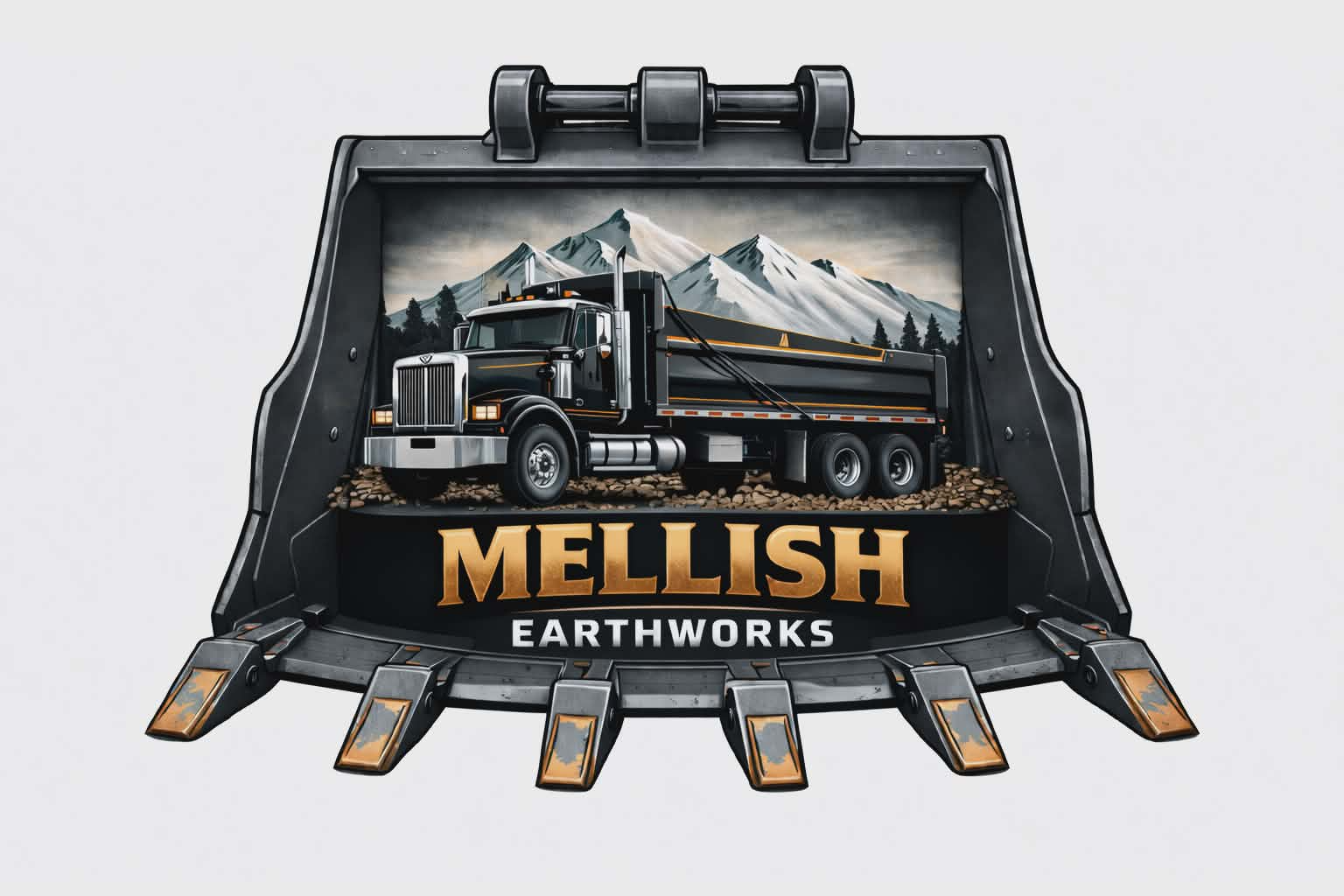
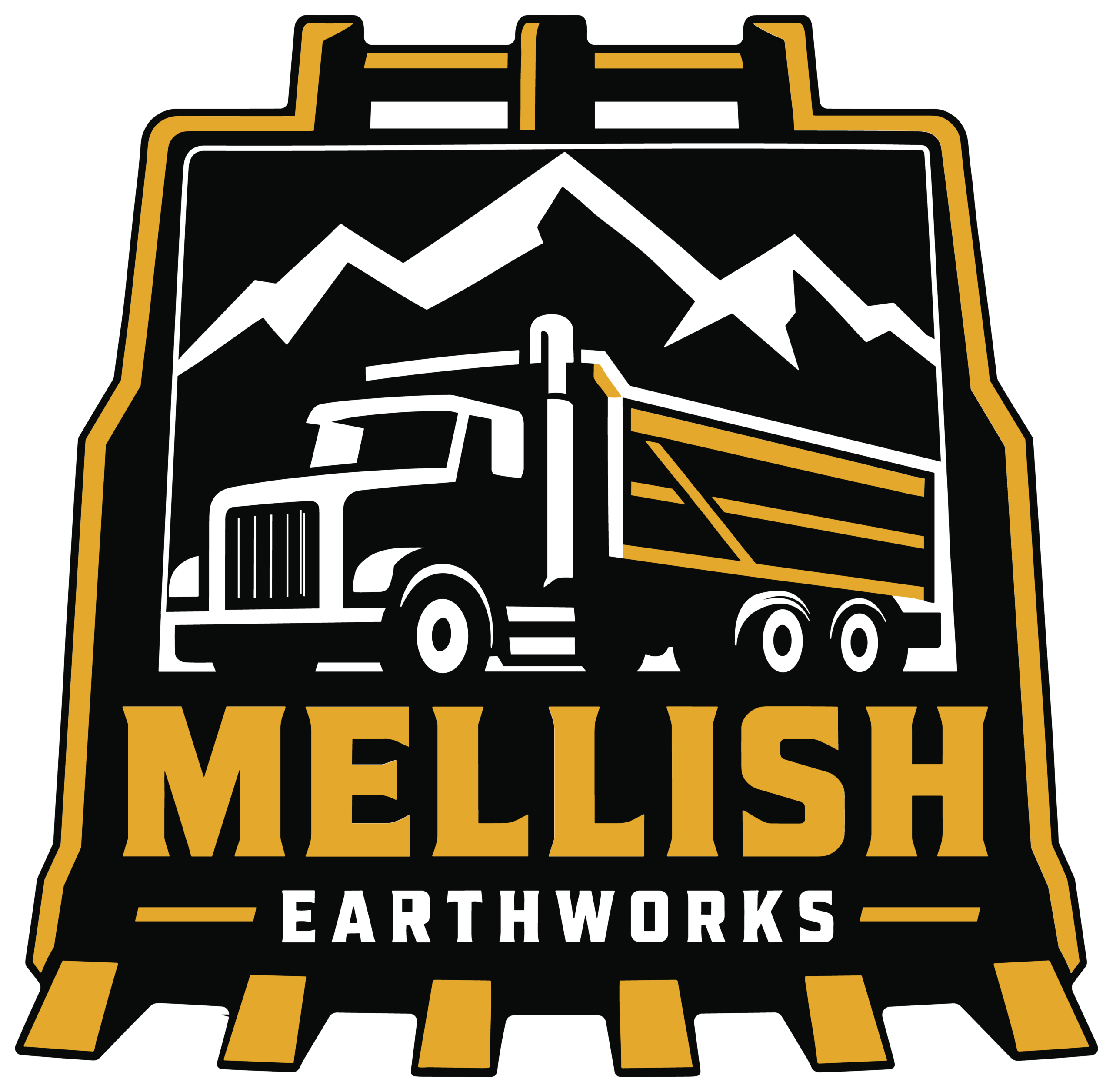
Here's a real example: a customer's AI-generated artwork, and the clean, print-ready version our team redrew from it.
From AI Image to
Production File
Most finished AI designs need to be vectorized before we can produce them. That's a real job done by a person, and it's billed as art time. Here's why, and what it costs.
AI gives you a picture made of pixels. Zoom in and the edges turn into blurry squares. A vector file is built from clean mathematical shapes, so it stays sharp at any size, from a pen to a banner. It also gives us exact, editable colours and text.
Why "auto-trace" isn't enough: one-click tools are a good start, but on AI art they usually produce lumpy edges, hundreds of stray shapes, and colours that drift. A designer has to redraw or clean up the result so it prints well.
Background removal, edge clean-up, colour lock, resized for print.
Full redraw into a clean vector file, real fonts set, colours matched.
Detailed illustrations rebuilt, simplified for embroidery or screen print, multiple versions.
We'll tell you which tier your file falls into before any work starts. No surprises on the invoice.
Embroidery note: digitizing (turning the vector into a stitch file) is a separate one-time setup fee. After that, we keep the stitch file on record for your re-orders.
Bigger than one design? If you're building a full brand for a club or business, our brand design packages include logo variations, vector and embroidery files, and starter apparel. Talk to us before you spend a weekend prompting.
What to Send Us
Send the items below and we can quote accurately and start faster. This checklist works for any print shop, not just ours.
- The original file: the largest PNG you can download, not a screenshot or a photo of your screen.
- Your exact text: names, slogans, years, and numbers typed out, with the spelling checked.
- Your colours: Pantone or hex codes if you have them, or "match our current logo".
- The product and method: for example "black hoodies, DTF full front" or "navy caps, embroidered front". Not sure? Tell us the product and we'll recommend a method.
- Size and placement: full front, left chest, sleeve, back, hat front.
- Quantity and deadline.
- Your prompt (optional but useful) shows us what you were going for.
- Any reference images of styles you like.
A Quick Word on Copyright & Trademarks
AI makes copying easy, but that doesn't make it legal. We can't print designs that use someone else's trademark or character, however the art was made.
Off limits without a licence: pro and college team logos (NHL, NFL, NCAA and so on), brand logos (Nike, Adidas and others), cartoon and movie characters, and anything "in the style of" a recognizable logo that's close enough to be confused with it.
Watch for accidental copies. AI tools sometimes reproduce real logos or near-copies without you asking. If it looks familiar, it might be.
Who owns AI art isn't settled yet. In Canada and elsewhere, how copyright applies to AI-generated images is still being worked out, and each AI tool has its own terms of use. If the design is going to be your club's or business's long-term logo, consider having it professionally redrawn, and talk to an intellectual property lawyer before you rely on it as your brand.
We may decline or ask about artwork that looks like it infringes on someone else's rights. It protects you as much as us.
Common Questions
Can you print my AI design as-is?
Sometimes. A clean, high-resolution, full-colour design printed with DTF may only need light clean-up. Embroidery and screen print almost always need the art redrawn first.
Which AI tool is best for t-shirt designs?
The tool matters less than the prompt. ChatGPT, Gemini, Midjourney, Canva, and Adobe Firefly can all produce usable concepts if you ask for flat artwork, limited colours, and a plain background. Firefly and Canva can also export some vector formats, but check them, since they still often need clean-up.
What file format should I send?
The original PNG at the largest size you can get. If your tool exports SVG or PDF, send that as well.
What resolution do I need?
For DTF, aim for 300 DPI at the actual print size. A 12" wide full-front print needs an image about 3,600 pixels wide. Most AI images download at 1,000–2,000px, which is why upscaling or vectorizing is often needed.
Can AI make an embroidery file?
No, not in a way that's usable in production yet. Embroidery files are digitized stitch by stitch from clean artwork.
Can I use AI to design my team's or company's logo?
Yes, for concepts. For a logo you'll use for years, we recommend a professional redraw and a conversation with an IP lawyer about ownership. See the copyright section above.
How much does vectorizing cost?
It depends on how complex the art is. See the three tiers above. We'll always confirm the price before we start.
Got an AI Design?
Let's Make It Real.
Send us what you've made, even if it's rough. We'll tell you what's printable, what needs work, and what it'll cost before anything gets produced.